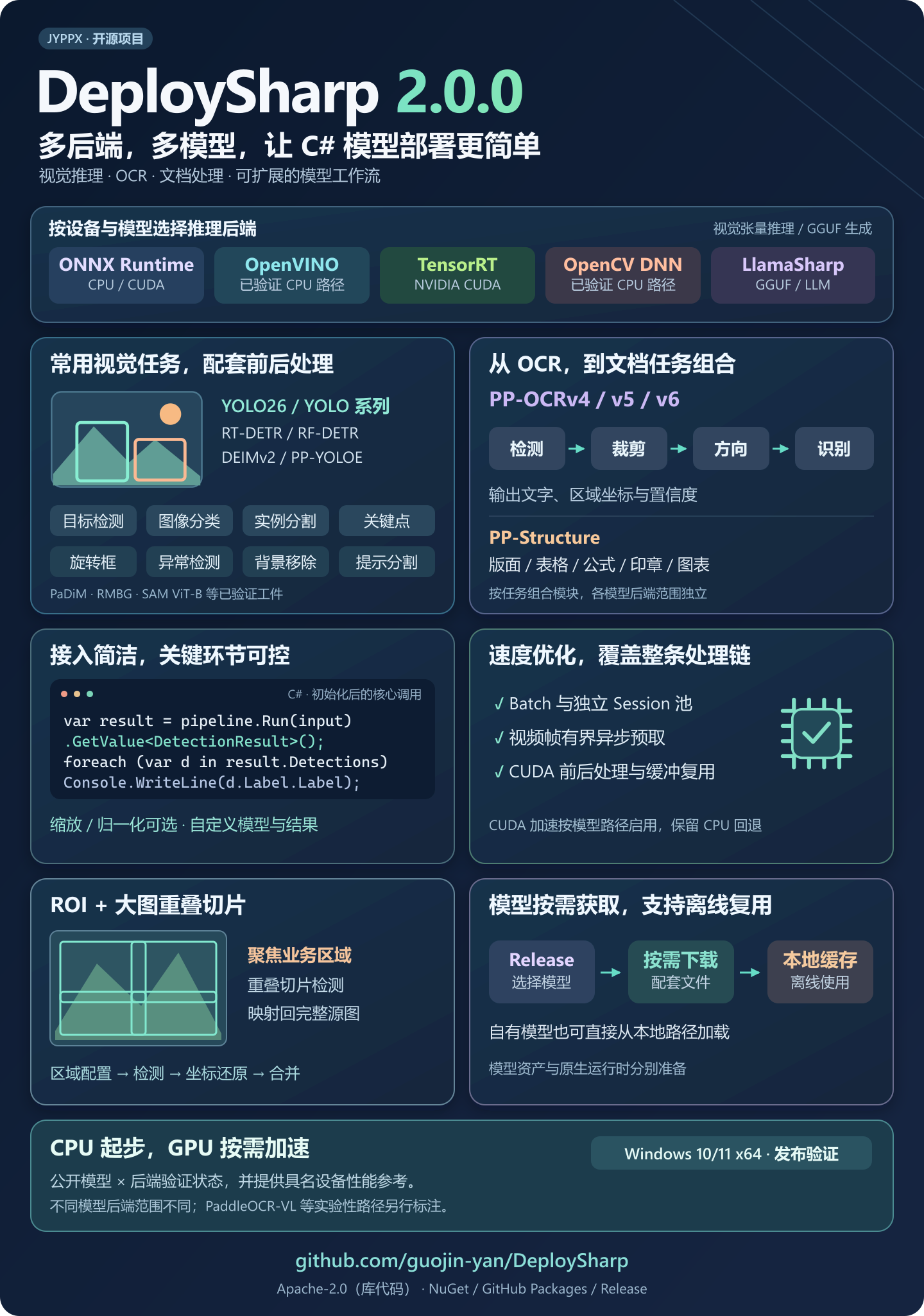
Using C# for model deployment not only allows the model to run, but also handles image scaling, normalization, output parsing, coordinate restoration, as well as the interfaces and operating environments of different inference engines. A detection model requires these tasks. If it is replaced by OCR, detection, cropping, direction classification and recognition must be reorganized.
I developed DeploySharp in the hope of sorting out these repetitive access tasks so that everyone can more conveniently use models, select inference engines, and continue to develop their own business functions in familiar C# projects.
Currently, the official version of DeploySharp 2.0.0 has been released! This version brings more complete multi-model and multi-engine deployment capabilities, expands OCR and document processing processes, and also adds processing functions for batch images, videos, and large images. Let’s first take you to understand the main content of the project and this update. Specific deployment cases will be gradually expanded in subsequent articles.
1. Introduction to DeploySharp project
DeploySharp is a dedicated C#/.NET DeveloperThe designed model deployment framework was developed and open sourced by “Jiaoyanpipixia”, and the project source code follows Apache License 2.0. it is based on ONNX Runtime、OpenVINO、TensorRT、OpenCV DNN and other inference engines, which provide supporting interfaces for model loading, parameter configuration, image pre-processing, inference execution and result post-processing to help developers integrate models into their own applications.
At present, the project has been integrated with visual tasks such as target detection, image classification, segmentation, pose estimation, rotating frame, industrial anomaly detection, background removal, etc., as well as PP-OCRv4/v5/v6 text recognition and PP-Structure document processing; At the same time, it provides corresponding model entrances for SAM prompt segmentation, CLIP image and text matching, BLIP image description and Qwen2.5 local text generation.
Multiple models, multiple engines, simple calling and flexible expansion are the main features of this project. Commonly used models can directly use supporting pre- and post-processing; your own models can also customize input processing, output decoding and result types. Model on-demand downloading, batch inference, multi-reasoner scheduling, asynchronous prefetching, ROI and large picture slicing provide room for further combination and optimization for actual projects.
Project address:
NuGet packages:search JYPPX.DeploySharpselect the required components by task.
Current 2.0.0 official version main verification Windows 10/11 x64; It is recommended to use .NET 10 for new projects, but you can also choose compatible target frameworks such as .NET 8 based on existing projects. The support scope of different components, models and backends varies. Detailed documentation and verification matrix entry are provided later.
This series also offers Complete process and multi-backend implementation of PP-OCRv5 Mobile on Ubuntu 22.04 x64showing how the same C# basic code is used in different systems. The cross-platform combination is subject to the specific records in the corresponding tutorial and verification matrix.
2. DeploySharp 2.0.0 core features
2.1 Multiple inference engine support, select deployment plan according to device
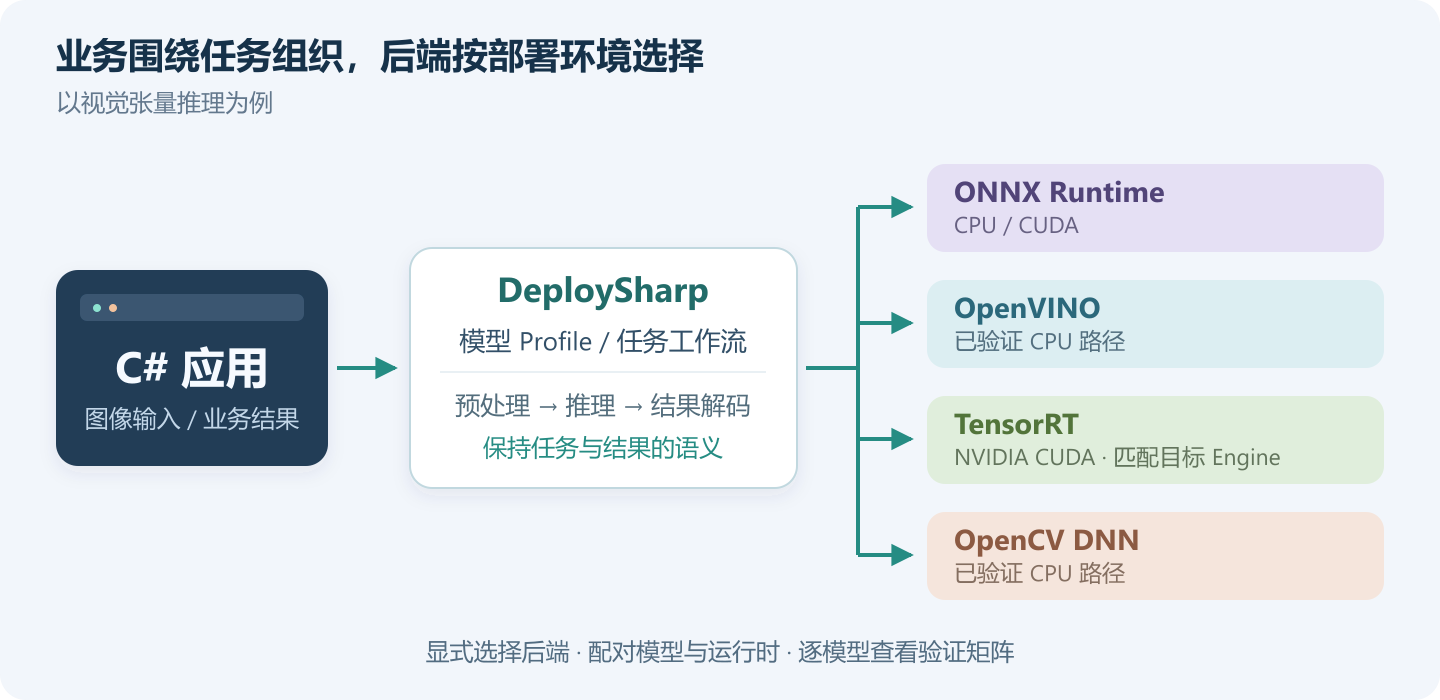
DeploySharp organizes vision tasks separately from the inference engine. For verified models, you can choose ONNX Runtime, OpenVINO, TensorRT or OpenCV DNN depending on the device and deployment environment, and the application code continues to revolve around images and task results.
- CPU is easy to get started with:You can run through detection or OCR first, and then evaluate the acceleration solution on the target device.
- Optional GPU path:ONNX Runtime CUDA, TensorRT, and corresponding CUDA vision processing paths are supported for verified models.
- Depend on on-demand composition:The image adapter is selected separately from the inference backend. For example, OpenCV is responsible for image reading and ONNX Runtime is responsible for inference.
The local language model uses a separate LlamaSharp adapter, and CPU text generation for Qwen2.5 GGUF is currently verified. The four engines in the figure are mainly targeted at visual model deployment.
The backend scope of each model is recorded separately. When selecting, you can confirm your model and target device according to the verification matrix.
2.2 Multiple model support, covering vision, OCR and document processing
The workload of model deployment is often concentrated in the processing before and after the model. DeploySharp provides supporting input preparation, output decoding and task results for the connected model, allowing the application to directly process frames, masks, key points, text and other information.
| the task you want to complete | Currently connected representative model |
|---|---|
| Target detection | YOLO26n, and the specific models of YOLOv5/v6/v7/v8/v9/v10, YOLO11/12/13; DEIMv2, RF-DETR, PP-YOLOE, RT-DETR |
| Classification, instance segmentation, key points, rotating boxes | YOLO’s corresponding task model, and RF-DETR Segment |
| Industrial anomalies and background removal | PaDiM MVTec AD Bottle、BRIA RMBG 1.4/2.0 |
| text recognition | Specific DET/REC and direction classification combinations of PP-OCRv4, v5, and v6 |
| Layouts, tables and document areas | PP-DocLayout, SLANeXt, UVDoc, PP-FormulaNet, UniMERNet, seal detection, PP-Chart2Table, etc. |
| Prompt segmentation, image-text matching and description | SAM ViT-B、CLIP ViT-B/32、BLIP Caption Base |
| local text generation | Qwen2.5 0.5B Instruct Q4_K_M |
The table above lists representative models; the exact model number, model ID, and support status are listed in the model support guide. Different models, exported images and backends of the same series still need to be confirmed separately.
2.3 OCR and document processing, from a single model to a complete process
OCR requires text detection, text line cropping, orientation processing, recognition and result merging. PP-Structure also faces tables, formulas, seals and charts on the page.
2.0 provides the task interface and combination process of these stages, and adds Batch and independent Session scheduling for the identification stage.
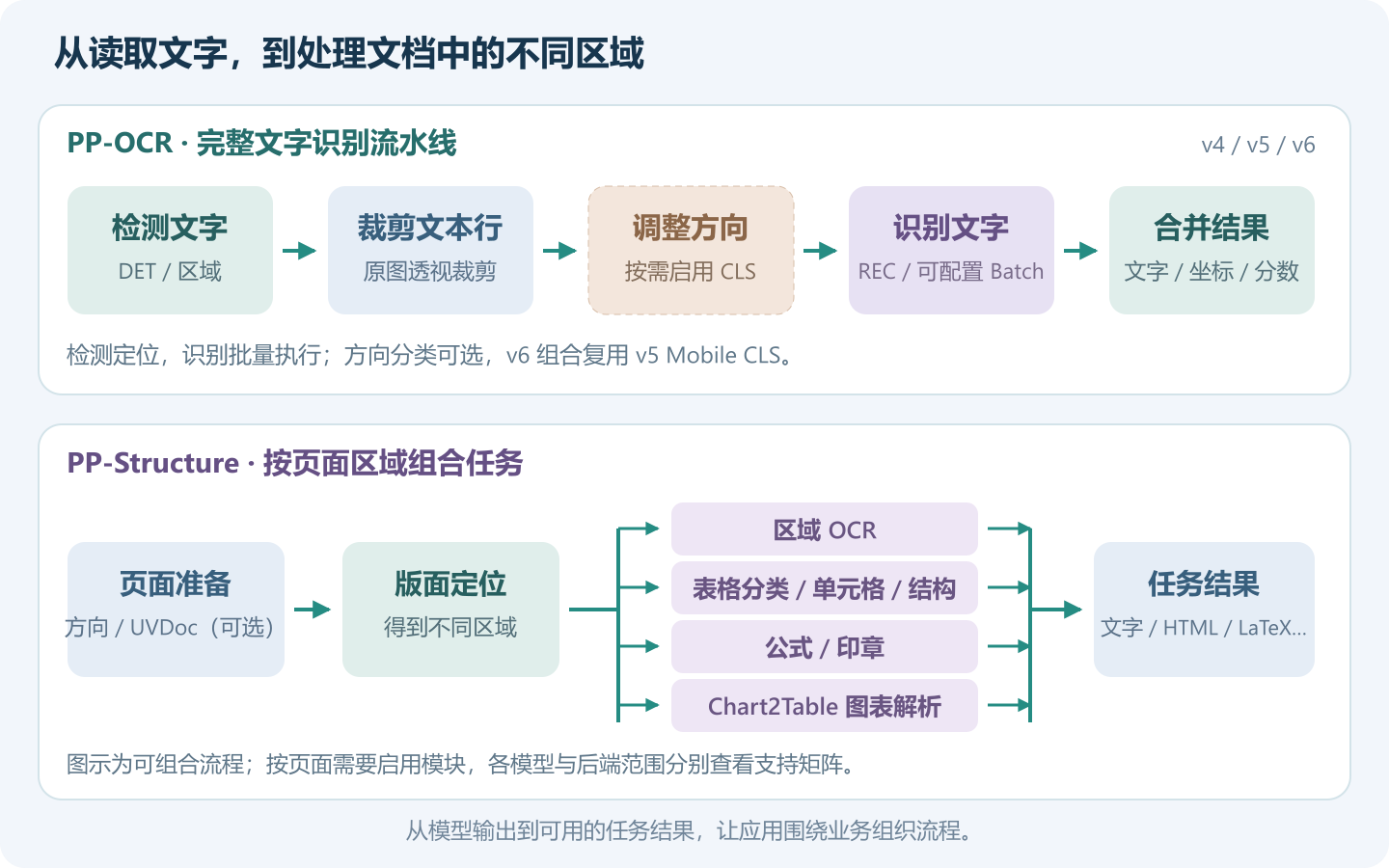
For ordinary OCR,You can choose specific combinations such as Mobile, Server, or v6’s Tiny/Small/Medium to obtain text, area coordinates, and confidence.
For document processing,Page preparation, layout positioning, and area tasks can be combined as needed. The warehouse already has cases such as regional OCR and wired forms to HTML. The complete process will be unfolded in subsequent articles.
The third article has used a Chinese newspaper page containing a headline, multi-column text, photos and legends to demonstrate complete OCR, text box drawing and TXT/JSON export. General OCR provides region-by-region text; cross-column reading order and regional division of titles, text, etc. need to be further combined with layout analysis.
The current v6 OCR combination reuses v5 Mobile CLS; the document modules have independent backend scopes. The PP-Structure topic will continue to develop regional OCR, forms and other document tasks on this basis.
2.4 Simple calling method, retaining custom expansion capabilities
Taking YOLO26 detection as an example, after completing the model profile and backend initialization, the core call can be kept very short:
using var input = new OpenCvVisualInputFactory()
    .CreateFromFile(imagePath, profile);
var result = pipeline.Run(input).GetValue();

foreach (var item in result.Detections)
    Console.WriteLine($"{item.Label.Label}: {item.Label.Score:F3}");
Here’s profile It describes input, output, and pre- and post-processing. VisualModelProfile,pipeline Hold the corresponding reasoning process. The fragment only shows the calls after initialization; the second YOLO26 actual combat provides the complete code for package installation, model preparation, initialization and result drawing, and uses the official version of NuGet package to complete Windows multi-backend comparison.
For your own model, the access method also retains options:
| actual demand | Sections that can be configured or extended |
|---|---|
| Different scaling methods were used during model training | Resize / Letterbox / CenterCrop |
| Input color, normalization is different | Preprocessing options such as channel order, layout, averaging and scaling |
| The output structure or business results are different | Custom decoder, pre-processing and result type |
Commonly used models directly use supporting processing, and self-owned models follow the same set of workflow extensions. The custom model chapter will use actual cases to expand these configuration and expansion methods.
2.5 Batch, video and large image processing, taking into account practical application needs
Real applications also encounter video frames, batches of pictures, and large-size images. 2.0 provides corresponding organization methods in these scenarios:
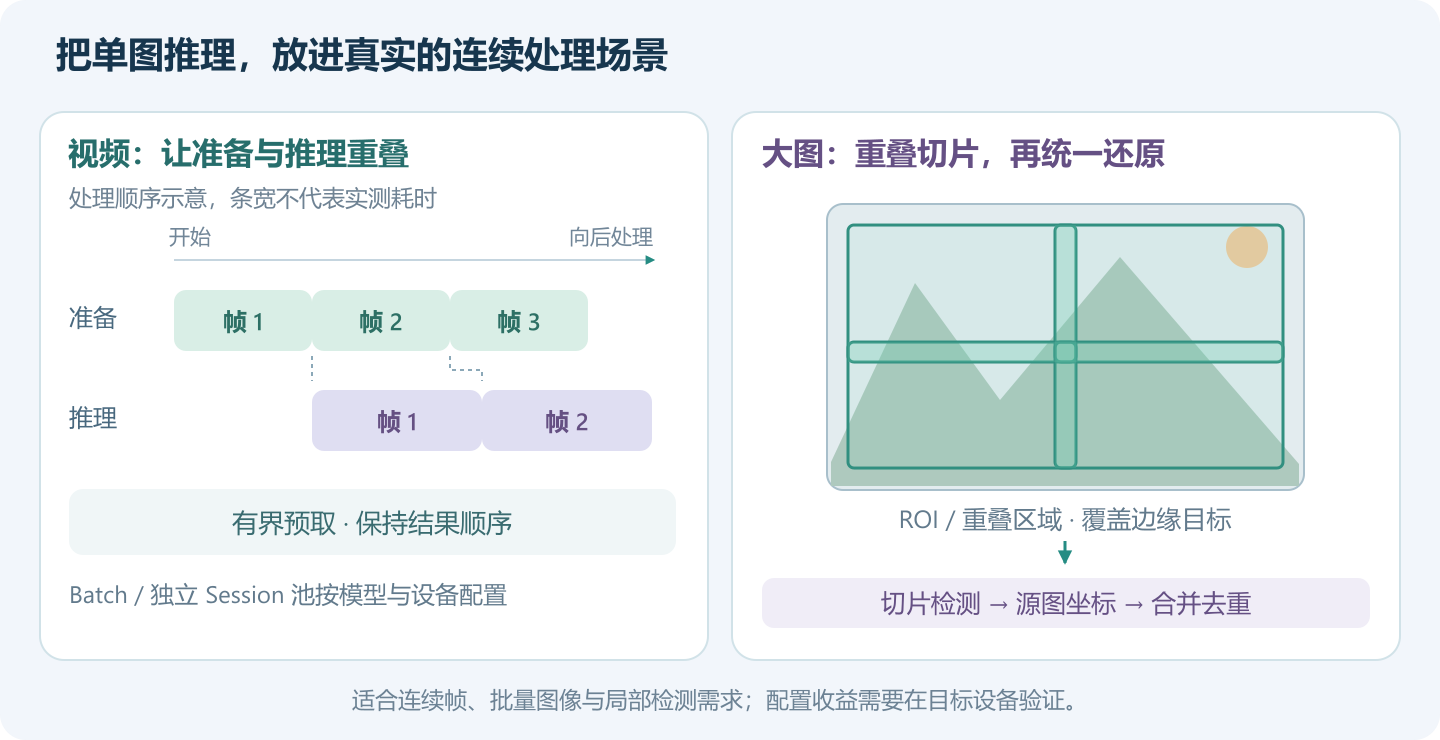
Batch and video:Use true Batch when the model supports it; multiple tasks can be scheduled through independent Session pools. Video frames support bounded asynchronous prefetching, allowing subsequent frame preparation to overlap with the current frame inference and maintaining result order.
ROI and the big picture:Configure business areas such as rectangles and polygons, or use overlapping sliding windows to detect large images, and then restore coordinates and merge duplicate results.
TensorRT CUDA:The supported paths can perform image scaling, normalization and some post-processing on the GPU, multiplex buffers and streams, and reduce intermediate data transmission; other processing retains CPU fallback.
These functions can be used for both batch tasks and continuous frame processing. When tuning, the complete time consumption, result quality, and resource usage should be checked at the same time. The number of batches and channels needs to be selected according to the model, input, and device. The third article first establishes the line-by-line OCR baseline, and then explains the scheduling parameters; the equipment actual measurement document also has the results of the corresponding combinations for reference.
2.6 Models can be downloaded on demand and support caching and offline reuse.
Public models have been organized into GitHub Release by visual, PaddleOCR, GGUF and other collections. You can select individual models or required Bundles, instead of downloading the entire collection for a lightweight model.
When you need to obtain public models online, you can use ModelFactory and a dedicated downloader to prepare models, dictionaries, and tokenizers according to the supporting list, and reuse the local cache. The application then prepares the native runtime of the selected backend.
If you already have a local model or a self-trained model, you can also load it directly through the file path. After configuring categories, input specifications, and corresponding pre- and post-processing, you can access the same set of inference processes; the second article provides methods for replacing images, models, and category files.
3. Module composition and application scenarios
DeploySharp 2.0 adopts a modular design. The core interface, visual processing, inference backend and model management are organized separately. When using it, you can select the required packages according to the task. The main modules are as follows, among which OCR and document processes are provided by the visual module.
| module | Main functions | Typical applications |
|---|---|---|
| Reasoning basics and extensions: Core/Extensibility | Models, tensors, inference sessions, results, and diagnostics; plugin and runtime descriptions | Customized inference tasks, running environment checks and extended access |
| Visual Tasks: Visual and Image Adapters | Image preparation, task configuration, output decoding and area processing; the supported TensorRT path also has CUDA visual adaptation | Target detection, defect detection, image segmentation, video and large image analysis |
| OCR and document workflow | Combining text detection, recognition, layout, tables, formulas and other stages | Image text extraction, page area processing, table HTML output |
| Inference backend: Backend.* | Connect to ONNX Runtime, OpenVINO, OpenCV DNN, TensorRT or LlamaSharp | Select execution engine based on model and device |
| Model management: ModelPack/ModelFactory | Describe model files, verify integrity, obtain on-demand and cache reuse | Download models online and prepare offline model catalogs |
| Language and Multimodality: LLM/Multimodal | Provides text generation, vector representation and multi-modal workflow interfaces | Currently verified local Qwen2.5 GGUF generation; other combinations selected by model description |
For example, a YOLO detection application can be composed of “model acquisition + visual processing + an inference backend”; OCR organizes multiple stages on top of visual processing; videos and large images can then add asynchronous prefetching, session scheduling or overlapping slicing as needed.
These capabilities can be incrementally added to existing projects. The verification scope of language and multi-modality is marked according to the specific model, and experimental paths such as PaddleOCR-VL are otherwise explained.
4. Why choose DeploySharp
For those who use C# to develop desktop software, industrial vision or document applications, DeploySharp mainly provides the following conveniences:
- Easy access, reducing duplication of development. The connected model provides supporting pre- and post-processing, and the application can directly use the results such as detection frames, masks, key points, and text to focus on the interface and business functions.
- A variety of engines are available for easy adaptation to equipment. You can use the CPU to run through the task first, and then evaluate OpenVINO, ONNX Runtime CUDA or TensorRT based on model support; batch and video tasks also have corresponding scheduling methods.
- The configuration is flexible and you can also connect your own models. Extension entries are reserved for scaling, color, normalization, output decoding and result types to facilitate adaptation of models and business data with different training methods.
- Open source code and usage materials are provided. The source code, model download portal, tutorials and cases are concentrated in the warehouse. You can not only start from an existing model, but also conveniently view the implementation, modify the code and prepare for offline deployment.
If you are adding model capabilities to your C# project, you can first select a corresponding case to run, and then gradually replace it with the actual model and business input.
5. Software acquisition and usage tutorials
5.1 NuGet installation and version acquisition
DeploySharp 2.0.0 has been released to NuGet.org、GitHub Packages 和 GitHub Release. Search in Visual Studio’s NuGet package manager JYPPX.DeploySharpjust install the corresponding package as needed; common combinations are as follows:
| Usage requirements | Main components (omitting common prefixes JYPPX.DeploySharp.) |
|---|---|
| Use OpenCV to read images and ONNX Runtime to perform visual reasoning | Visual.OpenCV + Backend.OnnxRuntime |
| Perform visual inference using OpenVINO or OpenCV DNN | Visual.OpenCV + Backend.OpenVINO or Backend.OpenCV |
| Use OpenCV to process images and TensorRT to execute the model | Visual.OpenCV + Backend.TensorRT |
| Using TensorRT CUDA image processing and dedicated vision pipelines | Visual.TensorRT + Backend.TensorRTselect image adapter by input source |
| Download and cache models by model directory | When you need to automatically download, add it again ModelFactory;Existing local models can be loaded directly |
The above is the main component combination, and the basic package dependencies are resolved by NuGet. All DeploySharp packages please keep the same 2.0.0and then press the backend to prepare the corresponding native runtime such as OpenCV, ONNX Runtime, OpenVINO or CUDA/TensorRT.
Visual.OpenCV Responsible for image input and pre-processing,Backend.OpenCV Responsible for OpenCV DNN inference; When using ONNX Runtime for inference, you can also use OpenCV to process images. The second article lists the installation combinations according to scenarios such as CPU, CUDA, OpenVINO, OpenCV DNN and TensorRT; the general dependency description is as follows:
Official version download and complete update instructions:
When upgrading from an old version, you need to pay attention: V2 has redesigned the API, V1 projects need to be migrated, and Alpha applications need to be recompiled after upgrading to the official version. Please read the release notes and migration guide in the repository before adjusting existing calls.
5.2 Models, cases and usage documents
Target detection can be done fromPart 2 YOLO26 Getting Started Practical PracticeTo start, text recognition can be viewed directlyThe third article PaddleOCR complete pipeline. Both articles use the official version of NuGet, providing runnable code, real results, and run configurations selected by backend:
| Practical cases | The environment and path that this series has been run on | Actual display |
|---|---|---|
| YOLO26n target detection | Windows:ORT CPU/CUDA、OpenVINO CPU、OpenCV DNN CPU、TensorRT CUDA | 4 pedestrians, 1 bus; coordinate restoration, result drawing and back-end consistency comparison |
| PP-OCRv5 Mobile complete recognition | Windows provided Ubuntu 22.04; Ubuntu 对光 ORT CPU, OpenVINO CPU, OpenCV DNN CPU, TensorRT CUDA | 144 text candidate areas of complex Chinese newspaper pages, saving TXT, JSON and text box images |
The second article also explains how to replace your own models, images, and class files, and provides the same version of the CUDA 12 runtime configuration used by native ORT CUDA. The third article also switches to running v4 Mobile and v6 Tiny on Windows, explaining dictionary pairing, Batch and independent inference channels. Each article retains the specific equipment, input and timing ranges for everyone to reproduce.
YOLO26 入门实战(第二篇):


PaddleOCR v4/v5/v6 完整流水线(第三篇):
The repository also organizes other use cases by functionality and specific models; a model support guide lists the exact models, and a validation matrix shows which backends each model has been validated for running.
使用教程:


模型案例:


模型支持指南:


模型与后端验证矩阵:
The inference time on different devices, as well as the Batch and inference channel configuration of OCR, are separately organized in the device performance measurement document to facilitate everyone to choose a solution and retest:
6. Summary and follow-up plans
DeploySharp 2.0.0 organizes the deployment of commonly used models, access to multiple inference engines, and OCR, document, video and large image processing into a set of composable C# class libraries. For already connected models, you can use ready-made processing procedures; if you have your own models and business needs, you can also continue to expand.
This article first introduces the main functions of the new version to you. The second and third articles have given practical examples of YOLO26 detection and complete PaddleOCR recognition, and demonstrated Windows multi-backend and Ubuntu OCR deployment. Based on these cases, we will continue to develop the following groups of topics:
- Visual model deployment:Taking YOLO26 detection as the starting point, we will talk about classification, segmentation, key points and rotating boxes to complete the process from model acquisition to result rendering.
- OCR and document processing:Continuing the complete recognition process of Part 3, we further explain PP-Structure’s layout analysis, regional OCR, table recognition and HTML output.
- Custom models and region processing:Connect your own pre- and post-processing and result types, configure ROI, and use overlapping slices to process small targets in the big picture.
- Multi-engine deployment and performance optimization:Expand the running environment, offline deployment, Batch, multi-reasoner, video asynchronous prefetching and TensorRT CUDA optimization, and explain parameter selection based on actual device measurements.
Specific articles will be updated to the series catalog as they are completed. You can choose to read according to your own needs:
Everyone is welcome to download, use, Star or Fork the project, and you are also welcome to submit questions and suggestions for improvements during use. When giving feedback, please include the model name, backend, operating environment and minimum replication code to facilitate location and repair.
Problem feedback:
DeploySharp library code adopts Apache License 2.0, and third-party libraries and models follow their respective licenses. Please see the project README for AI-assisted development instructions, software statement and contact information.