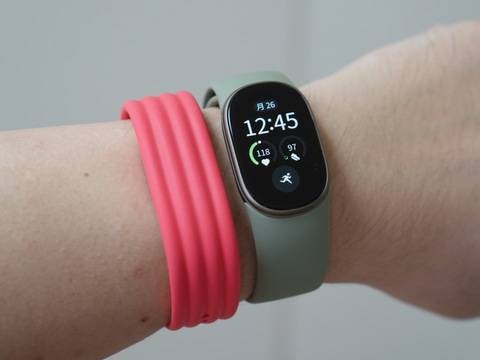
Google’s smart band “Google Fitbit Edge” has been released. The price is 26,800 yen and it will be released on October 27th at Google Store etc. The most notable features are the compact casing equipped with a highly visible 1.34-inch AMOLED display, and a repair-friendly design that allows users to replace the battery themselves.
In addition, in addition to advanced workout guidance and sleep analysis using Gemini-based Google Health Coach (requires a Google Health Premium subscription), it also has a wealth of health management functions such as heart rate, blood oxygen wellness, and skin temperature fluctuations, built-in GPS, and supports up to 7 days of battery life.
Fitbit Edge is a model that is located between the “Google Fitbit Air” and “Google Pixel Watch,” which will be described later, and is a product that combines the best features of the lightweight Fitbit Air with the display, clock, and health care features of the Pixel Watch.
A model with a screen that falls between Air and Pixel Watch
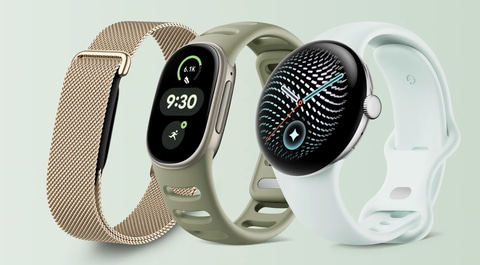
Fitbit Edge (center of photo), located between Fitbit Air and Google Pixel Watch
Google Fitbit Air was just released in May 2026 as a product bearing the Fitbit name. The price starts at 16,800 yen, which is cheaper than the Fitbit Edge. Fitbit Air is a new health tracker that intentionally eliminates the display to make it smaller and lighter and has a long battery life of up to one week. By combining an extremely small body equipped with a high-precision sensor with a variety of interchangeable bands, we have achieved a comfortable fit that does not bother you even when you sleep.
In fact, I’m also interested in the Fitbit Edge, as I’ve been using it for a while because I like its small casing and how comfortable it is to wear. I would like to review what are the differences between the two models, and what are the advantages and issues that I found after using them.
First, let’s check the differences between the two models in terms of hardware design and handling. Both models take distinctly different approaches when it comes to appearance, buttons, charging methods, and attachment mechanisms.
Compare appearance. Is it a tiny body without a screen or an aluminum case?
Fitbit Air is a pure sensor device with no display. The weight of the main unit alone is only 5.2g, and even with the band attached it is incredibly light at about 12g. The rounded resin body does not make a statement on your wrist, and it feels more like a high-quality silicone accessory or misanga than a gadget.
Air’s tiny body without a screen
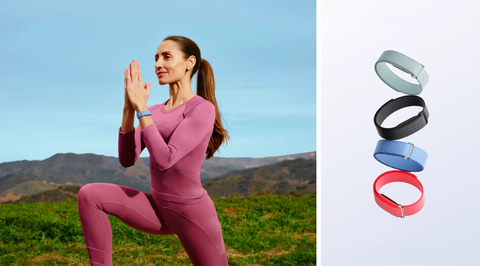
Fitbit Air uses a sensor body without a display
The Fitbit Edge, on the other hand, uses an ultra-thin recycled aluminum case with a thickness of 11.58mm. The weight excluding the band is light at 17.7g. Of course, it’s a little heavier than the Air, but…
There is a 1.34-inch AMOLED display on the front. The display is said to be approximately 40% larger than the previous model “Fitbit Charge 6”. I felt that the colors were bright and the visibility was clear even under direct sunlight. In addition, the aluminum metal frame gives off a luxurious feel that will fit comfortably in business or dressed-up situations. The following four colors are available depending on the combination of case and band, giving it a stylish appearance.
- Matte Black/Obsidian
- Satin Silver/Fog
- Satin Pyrite/Olive
- Champagne Gold/Canyon
The screen is mounted in an aluminum case with a thickness of 11.58 mm.
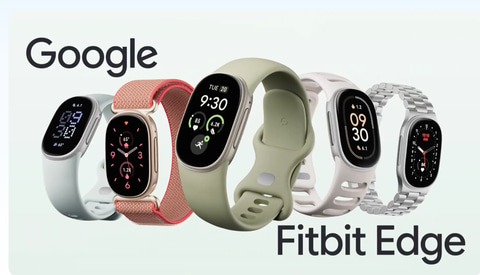
Fitbit Edge uses an ultra-thin recycled aluminum case with a thickness of 11.58 mm and is equipped with a display.
Differences in operating system. Air without buttons and Edge with tactile buttons
There is also a contrast in the design of the control system. Fitbit Air has no physical buttons or touch sensors whatsoever. There are no hand-operated elements, and all operations, from changing settings to viewing data, are done through the Google Health app on the paired smartphone.
Only Edge has buttons on the side.
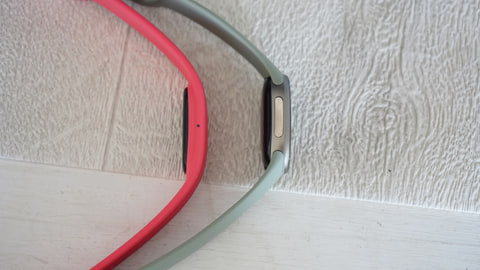
Comparison of the left side of the main body. Fitbit Air (photo = left) and Fitbit Edge (photo = right)
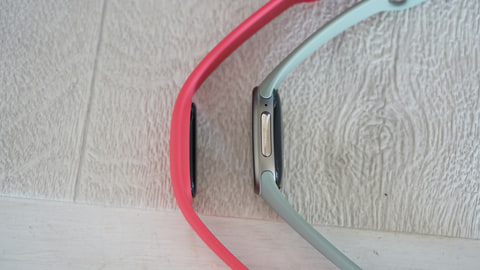
Comparison of the right side of the main unit
Fitbit Edge, on the other hand, has a physical side button with haptic feedback (Haptic) on the side of the main unit in addition to touch and swipe operations on the display. By pressing this button, you can intuitively call up the app list, return the display, and start/stop a workout. A major feature is that when you push it in, a pleasant vibration is transmitted to your fingertips, giving you a reliable feeling of operation even when you’re running or wearing gloves.
Physical side buttons with haptic feedback

Physical side button. You can easily call up the list of apps and return to the display at your fingertips.
Regarding the charging interface, both models use a magnetic charging cable that snaps onto the metal terminal on the bottom. The AC adapter side of the cable is USB Type-C, and the main body side is connected with a magnet. The charger is common, so if you switch from Fitbit Air to Fitbit Edge, you can use the charger that came with Fitbit Air to Fitbit Edge.
You can also charge Edge with the charger that comes with Air.
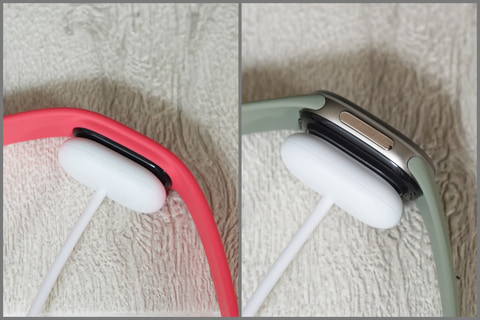
The charger that comes with Fitbit Air can be used for Fitbit Edge
Fitbit Edge and Fitbit Air have the same battery life and charging specifications, and both can last up to 7 days. It can be fully charged in about 90 minutes, and a 5-minute quick charge can provide up to 1 day’s power. However, Edge lasts up to 2 days when the display is always on, and up to 10 hours when using continuous GPS, which varies depending on usage conditions.
The Edge is the first Fitbit fitness tracker to feature a “Repairable Design,” which incorporates an internal modular structure. While maintaining 5ATM/IP68 water and dust resistance, the structure allows users to replace the battery themselves in the event of battery deterioration in the future. Although small trackers tend to be disposable, the maintainability that allows you to use one device for a long time is a point that will be highly appreciated by users who expect to use it for a long time.
Check how to wear it and how to replace the band. Should I push out the main body or release it with a button?
The fit and method of replacing the band are different for both models. With Fitbit Air, you put your finger on the outside of the band (where the main body is) and push the main body toward the back, whereas with Fitbit Edge, you can remove the band by pushing in the button near the frame of the case with your nail instead of the band itself. There is no need to press the button when wearing the band. However, both models do not require special tools or complicated pin operations, and the bands can be replaced immediately.
Push out the main unit for Air, and remove with a button for Edge.
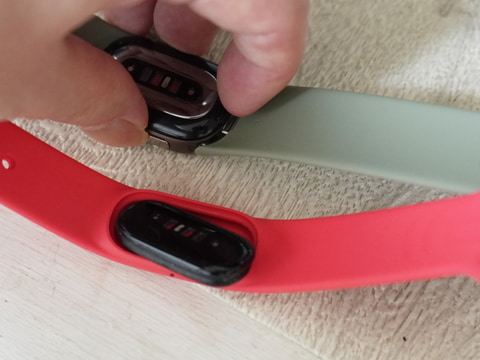
Bands can be easily replaced. No tools are required for replacement. Fitbit Air (photo = front) can be replaced more easily than Edge (photo = back) because it comes off just by pushing the main unit with your finger.
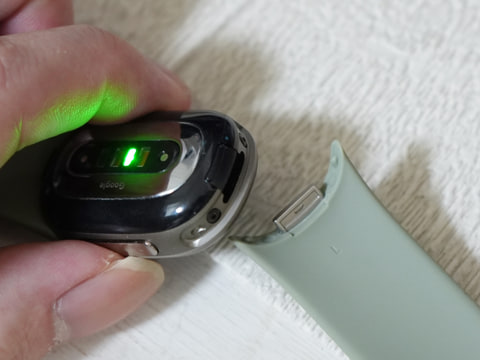
For Edge, remove the band by pushing in the button near the frame with your nail instead of pushing it out.
As for the feeling of wearing, the Edge has a display and an aluminum casing, so compared to the Air’s weightlessness of about 12g, which makes you forget you’re wearing it, it gives you a moderate feeling of wearing and presence on your wrist. Although it doesn’t bother me at all when worn during the day, At bedtime, Air still lasts all day long due to its lightness. I feel that.
Next, we will actually wear both models on our wrists and examine what functional differences and differences in experience they will experience in daily life, exercise, and health management.
What about visibility and immediate response at hand? Real-time confirmation of clock, notifications, and numbers
Needless to say, the biggest difference in daily use is the presence or absence of a display.
When wearing Fitbit Air, there is no information that can be checked at hand. There is no way to check the time, or to know the current number of steps, heart rate, or notifications of calls and messages received on your smartphone. Although the main unit vibrates, it only vibrates when an alarm or timer is activated, and there is no function to notify you of smartphone notifications by vibration. Therefore, Air can be said to be a device that functions as a “silent logger that silently collects data in the background.”
Check the time and step count at a glance on your wrist
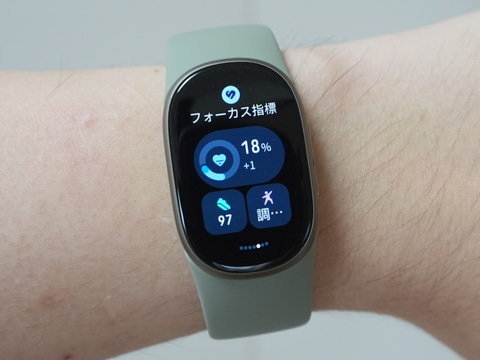
You can instantly check various information on the 1.34-inch AMOLED display.
The Fitbit Edge, on the other hand, has a 1.34-inch AMOLED display on hand, allowing instant information access similar to that of a smartwatch. With a twist of your wrist or a tap on the display, you can see the current time, real-time heart rate, steps taken and calories burned that day. Additionally, you can check incoming calls, text messages, and app notifications from your smartphone in real time.
Display your current heart rate at your fingertips
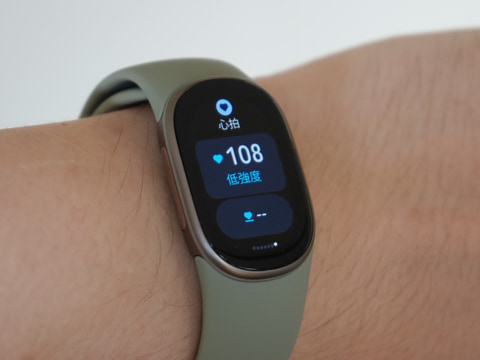
You can also check your heart rate in real time
Compare workout and activity measurement
This difference becomes even more pronounced in sports and fitness fields. Fitbit Air also has “automatic activity tracking” that automatically detects and records daily walking, running, etc., and you can check your exercise log later on the Google Health app. However, Air does not allow you to know what pace you are currently running or what zone your heart rate is in during exercise.
Fitbit Edge, on the other hand, functions as a full-fledged sports tracker. In addition to being able to select from over 40 different workout modes on the handheld display and start measuring immediately, “real-time guidance” such as heart rate zones (fat burning, aerobic, peak, etc.), split times, and pace targets are displayed during exercise, so you don’t have to take out your smartphone.
What is the difference between healthcare sensing and health management?
Although both models share the same foundation in terms of health data tracking performance, Edge is stepping into more advanced medical and preventive areas.
Both models are equipped with a full range of basic healthcare functions, including 24-hour continuous heart rate measurement, heart rate variability (HRV), blood oxygen wellness (SpO2), respiratory rate, measurement of nighttime body temperature fluctuations using a skin temperature sensor, and irregular heartbeat notification (AFib detection). The acquired data is aggregated into the Google Health app, and users can receive personalized sleep and health advice from a Google Health coach powered by Gemini.
However, Fitbit Edge adds its own advanced sensing technology. The first of these is the Google electrocardiogram app (ECG). By opening the Google Health app on your smartphone, performing the initial setup and consent from the health check items (ECG), and touching the metal side frame and button with your finger, you can measure an electrocardiogram on demand and self-check for signs of atrial fibrillation on the spot.
Electrocardiogram is measured after initial settings are made in the app.
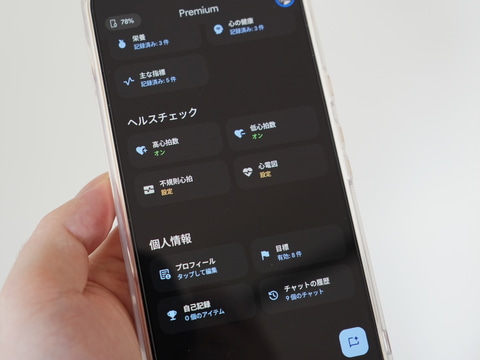
Initial settings are required to measure an electrocardiogram. Perform initial settings from the “Google Health” app
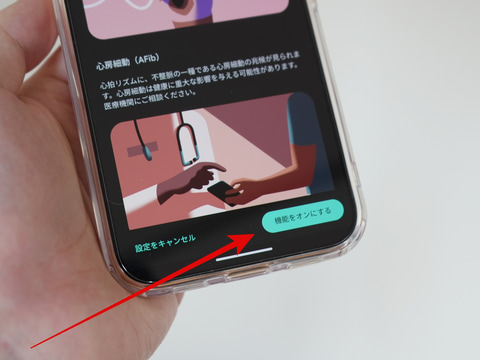
After reading the guidance carefully, tap “Turn on feature”
Also, similar to Fitbit Air, the device will soon be compatible with the Health Guardian feature, which silently tracks physiological changes such as vascular stress, metabolic stress, and insulin resistance trends in the background (some advanced indicators require Google Health Premium), allowing Google Health Coach to quickly detect subtle changes in your physical condition and suggest specific lifestyle improvement plans. Not just a record, The unique value of Edge is that you can measure your electrocardiogram at your fingertips and understand your health status.
The stress caused by the presence or absence of a screen and the answer provided by Fitbit Edge
As I’ve mentioned so far, the display-less Fitbit Air’s light weight of about 12g including the band and the stamina of not having to charge for up to a week are really attractive, but the hassle of having to take out your smartphone and open the app every time you check the time, step count, or heart rate has definitely become a daily stress. Fitbit Edge solves this problem.
The 1.34-inch AMOLED display allows you to instantly check the time, notifications, and heart rate zone during exercise by simply turning your wrist. Still, it is commendable that it is equipped with a high-precision GPS and ECG sensor and maintains the same “long battery life of up to 7 days” as the Air.
For users who were attracted to the comfort of displayless devices but were dissatisfied with the visibility at hand, Fitbit Edge is the best answer that combines immediacy and stamina at a high level You could say that.